Basic Computer Organization Instruction Set Addressing Modes CPU Memory
Category: COMPUTER SCIENCE | 30th October 2025, Thursday
The Fundamental Structure And Functioning Of A Computer System Are Explained Through The Concept Of computer Organization. It Describes How Different Hardware Components Of A Computer Interact To Perform Operations Such As Input, Processing, Storage, And Output. Every Digital Computer, Regardless Of Its Size Or Complexity, Consists Of Several Basic Units — The Central Processing Unit (CPU), memory, input/output (I/O) Devices, And An instruction Set Architecture that Defines How Software Communicates With Hardware. Understanding These Elements Provides Insight Into How A Computer Executes Programs And Processes Data Efficiently.
1. Basic Computer Organization Overview
A Computer System Operates By Following The Sequence Of Input, Process, And Output. The input Unit takes Data From External Devices Such As Keyboards Or Sensors. The processing Unit (CPU) manipulates This Data Based On Instructions. The memory Unit Temporarily Or Permanently Stores Data And Instructions, While The output Unit displays Or Transmits The Results.
These Units Are Interconnected Through Communication Pathways Known As buses — The data Bus, address Bus, And control Bus. Together, They Facilitate Data Movement, Instruction Execution, And Control Signal Transmission. The Proper Coordination Among These Components Ensures That A Computer Performs Tasks Systematically And Accurately.
2. Central Processing Unit (CPU)
The Central Processing Unit (CPU) is The Brain Of The Computer. It Executes Instructions, Controls All System Operations, And Coordinates Activities Among The Other Components. The CPU Consists Of Three Main Parts:
1. Arithmetic Logic Unit (ALU)
2. Control Unit (CU)
3. Registers
Arithmetic Logic Unit (ALU)
The ALU Performs Arithmetic Operations Like Addition, Subtraction, Multiplication, And Division, As Well As Logical Operations Such As AND, OR, NOT, And XOR. The ALU Receives Data From Registers, Performs The Specified Operation, And Stores The Result Back Into A Register. It Also Generates Condition Flags That Indicate The Status Of The Operation, Such As Zero Result, Overflow, Or Carry.
Control Unit (CU)
The Control Unit Directs The Operation Of The Processor. It Interprets Machine Instructions And Generates The Required Control Signals To Coordinate Data Transfer And Processing. The CU Determines Which Instruction To Fetch, Decode, And Execute Next, Thereby Synchronizing The CPU’s Internal Operations Through Clock Pulses.
Registers
Registers Are Small, High-speed Storage Elements Inside The CPU. They Temporarily Hold Data, Addresses, Or Instructions During Execution. Important Registers Include:
- Program Counter (PC): Holds The Address Of The Next Instruction.
- Instruction Register (IR): Stores The Current Instruction Being Executed.
- Accumulator (AC): Used For Intermediate Arithmetic Results.
- Memory Address Register (MAR): Holds The Address Of Data In Memory.
- Memory Data Register (MDR): Holds The Actual Data Fetched Or To Be Written To Memory.
The CPU Operates In Cycles Known As The **instruction Cycle**, Which Includes Fetching The Instruction, Decoding It, Executing It, And Storing The Result.
3. Memory Organization
Memory Is The Workspace Of A Computer System, Where Data And Instructions Are Stored For Processing. Memory Can Be Categorized Based On Its Speed, Size, And Volatility. The Two Main Types Are primary Memory and secondary Memory.
Primary Memory
Primary Memory, Or main Memory, Directly Interacts With The CPU. It Includes:
- RAM (Random Access Memory): A Volatile Memory Used To Store Data Temporarily During Execution. When Power Is Off, Data Is Lost.
- ROM (Read Only Memory): A Non-volatile Memory That Contains Firmware Or Permanent Instructions Needed For System Startup.
Primary Memory Is Organized As A Collection Of Cells, Each Identified By A Unique Address. The CPU Uses These Addresses To Fetch Or Store Data. The Access Time For Primary Memory Is Measured In Nanoseconds, Making It Extremely Fast Compared To Secondary Storage.
Secondary Memory
Secondary Memory Refers To Non-volatile Storage Such As Hard Drives, SSDs, And Optical Disks. It Provides Long-term Data Retention And Higher Storage Capacity, Though It Is Slower Than Main Memory. Data From Secondary Memory Is First Loaded Into Primary Memory Before Execution.
Cache Memory
Between The CPU And Main Memory Lies cache Memory, A Small But Extremely Fast Storage Unit. Cache Holds Frequently Used Data And Instructions To Reduce Memory Access Time. Modern Processors Use Multi-level Caches (L1, L2, And L3) To Improve Overall System Performance.
4. Instruction Set Architecture (ISA)
The instruction Set defines The Collection Of Commands That A CPU Can Execute. It Forms The Interface Between Software And Hardware. Each Instruction Is Represented In Binary Format And Specifies An Operation (opcode) Along With The Data (operands).
An Instruction Typically Consists Of Two Parts:
- Opcode: Specifies The Operation To Be Performed.
- Operand: Specifies The Data Or Address Of The Data On Which The Operation Acts.
For Example, The Instruction:
ADD R1, R2
means “add The Contents Of Register R2 To Register R1.”
Instruction Sets Vary Among Computer Architectures, But Most Include Categories Such As:
- Data Transfer Instructions (MOVE, LOAD, STORE)
- Arithmetic Instructions (ADD, SUB, MUL, DIV)
- Logical Instructions (AND, OR, NOT)
- Control Instructions (JUMP, CALL, RETURN)
- Input/Output Instructions (IN, OUT)
Modern CPUs Implement Either A Complex Instruction Set Computer (CISC) architecture, Which Uses Many Complex Instructions, Or A Reduced Instruction Set Computer (RISC) architecture, Which Focuses On Fewer, Simpler, And Faster Instructions.
5. Addressing Modes
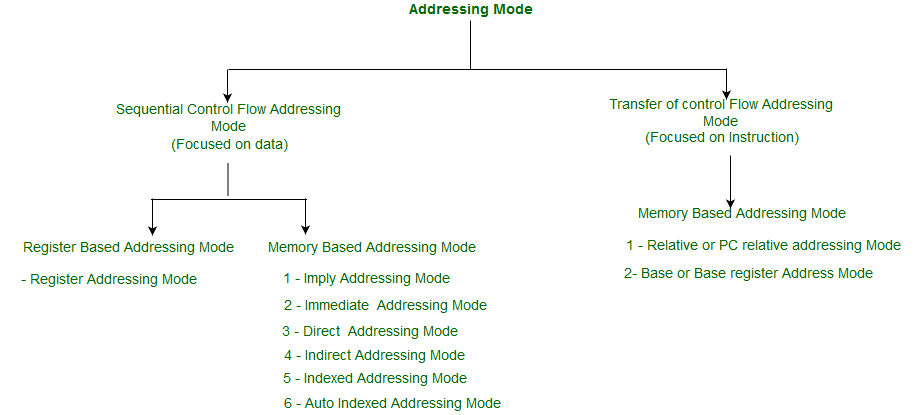
Addressing Modes define How The CPU Identifies The Location Of An Operand (data). Since Data Can Be Stored In Registers, Memory, Or Included Directly In The Instruction, Different Addressing Techniques Are Required. The Addressing Mode Determines Whether The Operand Is A Constant Value, A Register, Or A Memory Address.
Common Addressing Modes Include:
1. Immediate Addressing Mode:
The Operand Is Specified Directly In The Instruction.
Example: `MOV R1, #25` → Load 25 Directly Into R1.
2. Register Addressing Mode:
The Operand Is Stored In A Register.
Example: `MOV R1, R2` → Copy Data From R2 To R1.
3. Direct Addressing Mode:
The Instruction Contains The Actual Address Of The Operand In Memory.
Example: `MOV R1, [5000]` → Move Data From Memory Location 5000 To R1.
4. Indirect Addressing Mode:
The Address Of The Operand Is Found In A Register Or Memory Location.
Example: `MOV R1, [R2]` → The Contents Of R2 Point To The Memory Address Containing The Operand.
5. Indexed Addressing Mode:
The Effective Address Of The Operand Is Generated By Adding A Constant (index) To The Contents Of A Register.
Example: `MOV R1, [R2 + 5]` → Operand Is Located At Address (R2 + 5).
6. Relative Addressing Mode:
The Operand’s Address Is Determined By Adding An Offset To The Current Instruction Address. This Mode Is Often Used In Branching Operations.
Addressing Modes Make Instruction Design Flexible And Efficient, Allowing Programmers To Access Data In Different Ways Without Needing Multiple Complex Instructions.
6. Input/Output Organization
The Input/Output (I/O) subsystem Connects The Computer To The External World, Allowing Interaction With Users, Devices, And Networks. It Includes Input Devices Such As Keyboards, Mice, And Sensors, As Well As Output Devices Like Monitors, Printers, And Speakers.
Since I/O Devices Operate At Speeds Much Slower Than The CPU, Specialized Hardware Called I/O Controllers manage The Communication Between Them. The CPU Uses I/O Instructions To Exchange Data And Control Signals With These Devices.
There Are Several Methods For Data Transfer Between CPU And I/O Devices:
1. Programmed I/O:
In This Method, The CPU Actively Waits And Checks The Status Of The I/O Device Before Transferring Data. This Approach Is Simple But Inefficient Because The CPU Remains Idle During The Wait Period.
2. Interrupt-Driven I/O:
Here, The I/O Device Interrupts The CPU When It Is Ready For Data Transfer. This Allows The CPU To Perform Other Tasks While Waiting For The I/O Operation To Complete.
3. Direct Memory Access (DMA):
In DMA, A Special Controller Transfers Data Directly Between I/O Devices And Main Memory Without Continuous CPU Involvement. This Method Significantly Improves Data Transfer Speed And CPU Efficiency.
7. System Buses And Communication
All Computer Components Are Interconnected Using buses. There Are Three Primary Types:
- Data Bus: Carries Actual Data Between CPU, Memory, And I/O.
- Address Bus: Carries The Address Of The Data Or Instruction.
- Control Bus: Carries Control Signals (like Read/write And Interrupt Signals) That Coordinate Operations.
The Efficient Organization Of These Buses Ensures Smooth Data Flow And Synchronization Among System Components.
8. Coordination Between CPU, Memory, And I/O
During Program Execution, The CPU Repeatedly Performs The fetch-decode-execute Cycle:
1. Fetch: The Control Unit Retrieves The Instruction From Memory (using The PC And MAR).
2. Decode: The Instruction Is Decoded To Determine The Required Operation And Operands.
3. Execute: The ALU Or I/O Subsystem Performs The Actual Operation.
4. Store: The Result Is Stored In Memory Or A Register.
Throughout This Process, The CPU Interacts Continuously With Memory And I/O Devices, Ensuring That All Operations Occur In A Precise, Synchronized Manner. Interrupt Mechanisms And Control Signals Further Enhance Coordination And Allow Multitasking.
9. Conclusion
The basic Computer Organization encompasses The Harmonious Interaction Of CPU, Memory, Instruction Set, Addressing Modes, And I/O Systems. The CPU Serves As The Control Center, Memory Provides The Workspace, And I/O Devices Connect The System To The External Environment. Instruction Sets And Addressing Modes Define How The CPU Interprets And Executes Commands Efficiently.
Together, These Components Form The Backbone Of Computer Functionality, Enabling Data Processing, Computation, And Communication In Modern Computing Systems. Whether In A Simple Microcontroller Or A Supercomputer, The Principles Of Computer Organization Remain Consistent — Demonstrating The Structured And Logical Nature Of Digital Computation.
Tags:
Basic Computer Organization Instruction Set Addressing Modes CPU Memory
